

Tipard Video Converter
Tipard allows publishers and partners to promote its software through RegNow and 2Checkout. Applicants create an account on a supported affiliate platform, submit an application, receive an affiliate ID after approval, and use that ID to generate tracked links or custom builds. Tipard promotes high commissions, custom-build tracking, access to current product versions, product-upgrade notices, and 24-hour technical support. The official page states that custom-build versions are available for Tipard Windows products; affiliates promoting Mac products should contact Tipard directly.
Overview

Commission & Conversion Tracking
How Tipard Video Converter calculates commissions and tracks conversions.
- Commission plans
- Tiered commission structure available. Contact affiliate team for specific rates.
Tracking
Attribution model | |
Tracking method | Affiliate IDs on RegNow/2Checkout and Tipard custom builds. The official page describes custom builds as 100% tracked; it does not specify cookie duration, pixel implementation, postbacks, or server-to-server tracking. |
Promotional Tools and Resources
Materials and resources provided to support your promotion efforts
BANNERS | |
TEXT LINKS | Yes |
SUPPORTS DEEP LINKING | Yes |
- More info about marketing materials
- Affiliate links generated through RegNow/2Checkout, Windows custom builds, RegNow trialware, Links to RegNow custom builds, Current Tipard product versions, Product-upgrade notifications, Technical support, Affiliate support through affiliate@tipard.com
Program Rules, Approval and Restrictions
Guidelines and limitations you need to follow when promoting Tipard Video Converter
SOCIAL MEDIA ALLOWED | |
EMAIL MARKETING ALLOWED | |
PPC ALLOWED | |
Trademark Bidding | |
GEOGRAPHIC RESTRICTIONS | No country or regional restrictions are published in the reviewed official materials. Availability may depend on RegNow/2Checkout account eligibility, payment rules, sanctions screening, and local law. |
COUPON SITE ALLOWED |
- Approval process
- Manual or network-mediated approval approval. Applicants must create an account on RegNow or 2Checkout, submit the relevant application, and obtain an approved affiliate ID. Tipard requires an approved RegNow or 2Checkout ID before affiliates can create custom builds. Mac-product promotion requires contacting affiliate@tipard.com. No published traffic, content-volume, domain-age, or website-quality threshold was found.
- Other restrictions
- Published materials do not provide a complete promotional policy. Affiliates should use approved links or custom builds, avoid inaccurate software claims, avoid misleading pricing or discounts, respect intellectual-property and privacy rules, and obtain direct guidance before using PPC, trademarks, coupon traffic, unsolicited email, or incentivized traffic.
Payouts and Payment Methods
How earnings are paid out and which methods are supported
Payment frequency | Monthly |
Payout currency | USD |
Minimum threshold | $100 |
- More payout info
- The official Tipard page says prompt commission payment is sent automatically after an order is completed. Third-party program data reports monthly processing, a $100 minimum threshold, and payment under the network's applicable requirements. These descriptions conflict slightly, so the network's current payout rules control.; Schedule: Monthly; third-party data also describes Net 30 processing. The official page does not publish a precise calendar date.
Payout methods
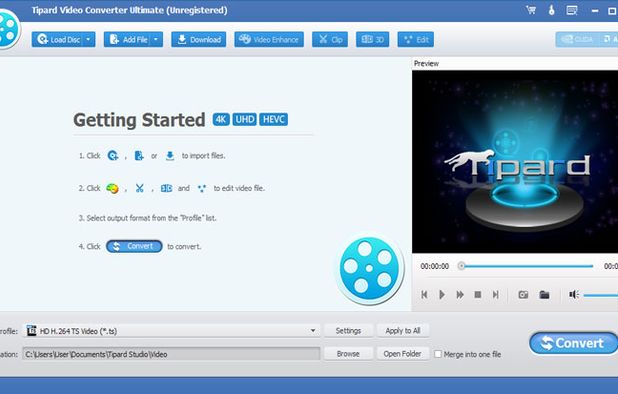
Tipard Video Converter overview
- Company
- Pricing model
- Buy once / Freemium
- App types
SUPPORTED PLATFORMS
Avangate Overview

Apps Similar to Tipard Video Converter with Affiliate Programs

Standalone media encoding application with robust format support, seamless Adobe app integration, efficient workflow for conversion tasks, and a structured, easy-to-navigate interface.

Wondershare UniConverter is a multimedia tool featuring a DVD and video converter, DVD burner, and video downloader. It supports multiple formats such as AVI, WMV, MP4, MKV, FLV, 3GP, and MPG, and can convert videos to 3D.

ConvertXtoDVD seamlessly converts AVI, MKV, WMV, YouTube, and more to DVD. Enjoy customizable menus, subtitle support, video editing, batch conversion, and multi-core processing for efficient, high-quality transfers. Supports NTSC and PAL formats for ultimate compatibility.

Converts and compresses a wide range of video formats including avi, mpg, wmv, asf, and mp4, offers batch conversion, DVD importing, customizable output settings, preview features, and compatibility with various devices like mobile phones and media players.

Convert videos, audios, DVDs, and images at 120X speed with HitPaw Univd. Simplifies the conversion process with drag-and-drop and one-click options. Supports numerous formats, ensuring compatibility and quality. Perfect for sharing on social media, extracting audio, or digitizing DVDs.

Converts videos from internet, camcorders, or capture cards to over 1000 mainstream formats like MP4 and MKV, offering lossless quality, fast processing, device compatibility including 3D, and customizable settings for optimal playback, sharing, or compression.