

Adobe RoboHelp
Has an affiliate program onPPartnerize
Adobe RoboHelp is an easy-to-use authoring and multichannel, multiscreen HTML5 publishing solution.
Adobe's affiliate program allows approved publishers to promote eligible Adobe products through websites and social media channels. Adobe says approved partners can use banners, text links, and custom links directing visitors to Adobe; a qualified purchase within 30 days can generate a commission. Adobe identifies Partnerize as the program manager and says the platform provides enablement, a content portal, tracking, dashboards, and commission payments.
Overview

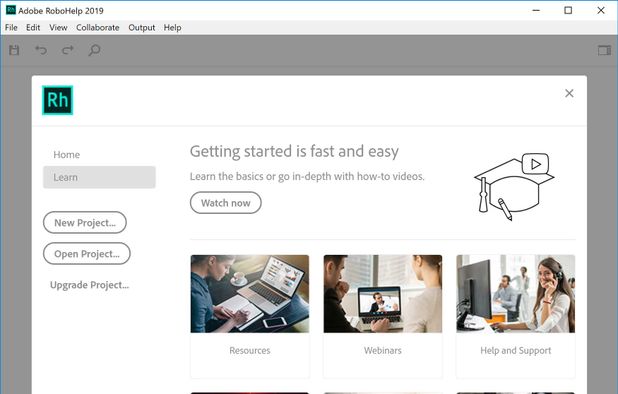
1of7•7 screenshots
Commission & Conversion Tracking
How Adobe RoboHelp calculates commissions and tracks conversions.
- Commission plans
- Multiple commission options available: 85.0% recurring (Subscription Subscription), 33.0% recurring (Subscription Subscription). Select the plan that aligns with your promotional strategy.
Subscription Subscription
85% of the first month's subscription price for eligible monthly subscriptions and annual subscriptions paid monthly.
Recurring
85%
Percentage
Subscription Subscription
33% of the first year's price for eligible annual subscriptions paid upfront.
Recurring
33%
Percentage
Tracking
Attribution model | Not publicly specified. The available official description establishes referral-link attribution and a 30-day cookie period, but does not state whether competing touchpoints are handled by last-click, first-click, or multi-touch attribution. |
Tracking method | Affiliate referral links, cookies, campaign tracking, dashboards, and Partnerize-managed conversion tracking. Adobe states that Partnerize provides tracking and reporting, but the public page does not specify pixels, postbacks, or server-to-server implementation details. |
Cookie duration | 30 days |
Promotional Tools and Resources
Materials and resources provided to support your promotion efforts
BANNERS | Yes |
TEXT LINKS | Yes |
SUPPORTS DEEP LINKING | Yes |
- More info about marketing materials
- Publicly confirmed materials include banners, text links, custom links, a Partnerize content portal, tracking, dashboards, and partner enablement support. The cited page does not confirm RoboHelp-specific banners, product feeds, APIs, coupon codes, data-feed formats, webinars, email templates, or downloadable brand assets.
Program Rules, Approval and Restrictions
Guidelines and limitations you need to follow when promoting Adobe RoboHelp
SOCIAL MEDIA ALLOWED | Yes |
EMAIL MARKETING ALLOWED | |
PPC ALLOWED | |
Trademark Bidding | |
GEOGRAPHIC RESTRICTIONS | Not publicly specified. Adobe's public affiliate page does not provide a complete approved-country or prohibited-country list. Availability may vary by Adobe storefront, campaign, tax status, and Partnerize account eligibility. |
COUPON SITE ALLOWED |
- Approval process
- Manual / application-based approval. No website required — Applicants must submit the affiliate form, review email instructions, join or accept Partnerize network terms, and request access to the Adobe campaign. Approval is required before using program materials. Adobe's public page does not specify minimum audience size, traffic volume, website age, content-quality threshold, business registration, tax documentation, or RoboHelp-specific qualifications.
- Other restrictions
- Promotional content must direct users through approved affiliate links or custom links and generate a qualified purchase. Affiliates should not misrepresent product eligibility, commission terms, Adobe affiliation, pricing, or product capabilities. The cited public page does not publish detailed restrictions covering trademark bidding, PPC, coupon codes, incentivized traffic, browser extensions, brand bidding, or adult, deceptive, illegal, or trademark-infringing content; these items require Partnerize campaign-term confirmation.
Payouts and Payment Methods
How earnings are paid out and which methods are supported
Payment frequency | Net30 |
Payout currency | USD |
Minimum threshold | $30 |
- More payout info
- Adobe states that Partnerize supports commission payment and partner account management, but the publicly available Adobe affiliate page does not disclose a minimum payout threshold, payment cadence, settlement terms, reversal policy, tax documentation rules, or payment-method list. These terms may appear inside the Partnerize application or campaign agreement.
Payout methods
PayPal
E-wallet
Wire Transfer
Banking
Adobe RoboHelp overview
- Company
- Pricing model
- Buy once / Paid
- App types
SUPPORTED PLATFORMS
Desktop
Windows
Partnerize Overview

Partnerize
AI automates partner discovery, tracking, payouts, fraud detection, and reporting with ITP compliance, real-time analytics, and conversion optimization tools. More info →