

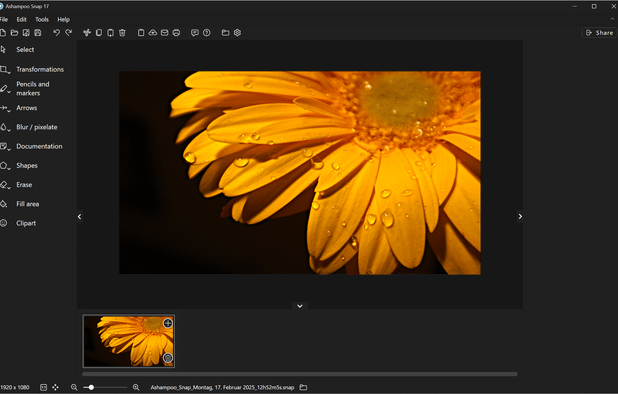
Ashampoo Snap
In our prestigious partner program we offer you the possibility to earn money with the Ashampoo software. We offer 30% standard commission for every sale by means of your website or newsletter. Special conditions and special offers can be negotiated individually on request.
Overview

Commission & Conversion Tracking
How Ashampoo Snap calculates commissions and tracks conversions.
- Commission plans
- Earn 30.0% one-time commission on referred purchases. Payment is made once per successful referral.
Tracking
Attribution model | |
Tracking method | special links in our shop |
Cookie duration | 45 days |
Promotional Tools and Resources
Materials and resources provided to support your promotion efforts
BANNERS | |
TEXT LINKS | Yes |
SUPPORTS DEEP LINKING |
- More info about marketing materials
- variety of marketing materials
Program Rules, Approval and Restrictions
Guidelines and limitations you need to follow when promoting Ashampoo Snap
SOCIAL MEDIA ALLOWED | |
EMAIL MARKETING ALLOWED | Yes |
PPC ALLOWED | No |
Trademark Bidding | |
COUPON SITE ALLOWED | |
TRAFFIC MINIMUMS | 5,000 visitors daily |
- Approval process
- Manual approval. Website required — You have at least 5,000 visitors daily. You have an extensive clientele that can be reached by e-mail. You always offer the latest software products on your website.
- Other restrictions
- You always offer the latest software products on your website.
Payouts and Payment Methods
How earnings are paid out and which methods are supported
Payment frequency | Net30 |
Payout currency | USD |
Minimum threshold | $50 |
Payout methods
Ashampoo Snap overview
- Company
- EU-based
- Yes
- Pricing model
- Buy once / Freemium
- App types
SUPPORTED PLATFORMS
CJ Overview

Apps Similar to Ashampoo Snap with Affiliate Programs

Provides versatile screen capture options, built-in image annotation, color picking and palette, precision measurement tools like ruler and protractor, hotkey customization, clipboard and multi-format support, simple tray access, sharing, and portable operation.

This all-in-one solution offers screen and webcam recording, video editing, and chroma key features, producing stunning HD-quality content easily shareable on platforms like YouTube and Screencast.com. Designed for training, presentations, and more, it supports H.264 format and compact file sizes.

Advanced screen capture and recording tool enabling image or video captures directly from your screen. Includes editing features like callouts, transparency, and effects to enhance visuals. Organize and easily share creations through documents, presentations, or favorite applications.

Open-source tool for screen and camera capture with 4K recording, timeline editor, instant sharing via links, privacy controls, no signup, multiple layouts, custom branding, cursor options, threaded comments, self-hosting, and paid AI-powered features available.

Capture and record screens on Mac with CleanShot X, featuring seamless recording, custom keyboard shortcuts, customizable wallpapers, Quick Access Overlay, and Desktop icon toggle for a tidy user interface.

Comprehensive screenshot and screencast tool offering full-screen, window, or region captures with a built-in editor. Supports cropping, resizing, labels, and effects, with integration for popular services. Free version includes some branding and is limited to 15s screen casts.